Build a new image from a written idea. Describe the subject, composition, light and visual style, then select an available image model and review its settings and credit estimate.
Original input, generation record and observations
Generator
Built-in image_gen
Model
Model version was not recorded
Usage and cost
Created outside Studio; no Studio credit receipt is linked to this record. The exact model version and actual generation charge are not retained.
Original generation prompt
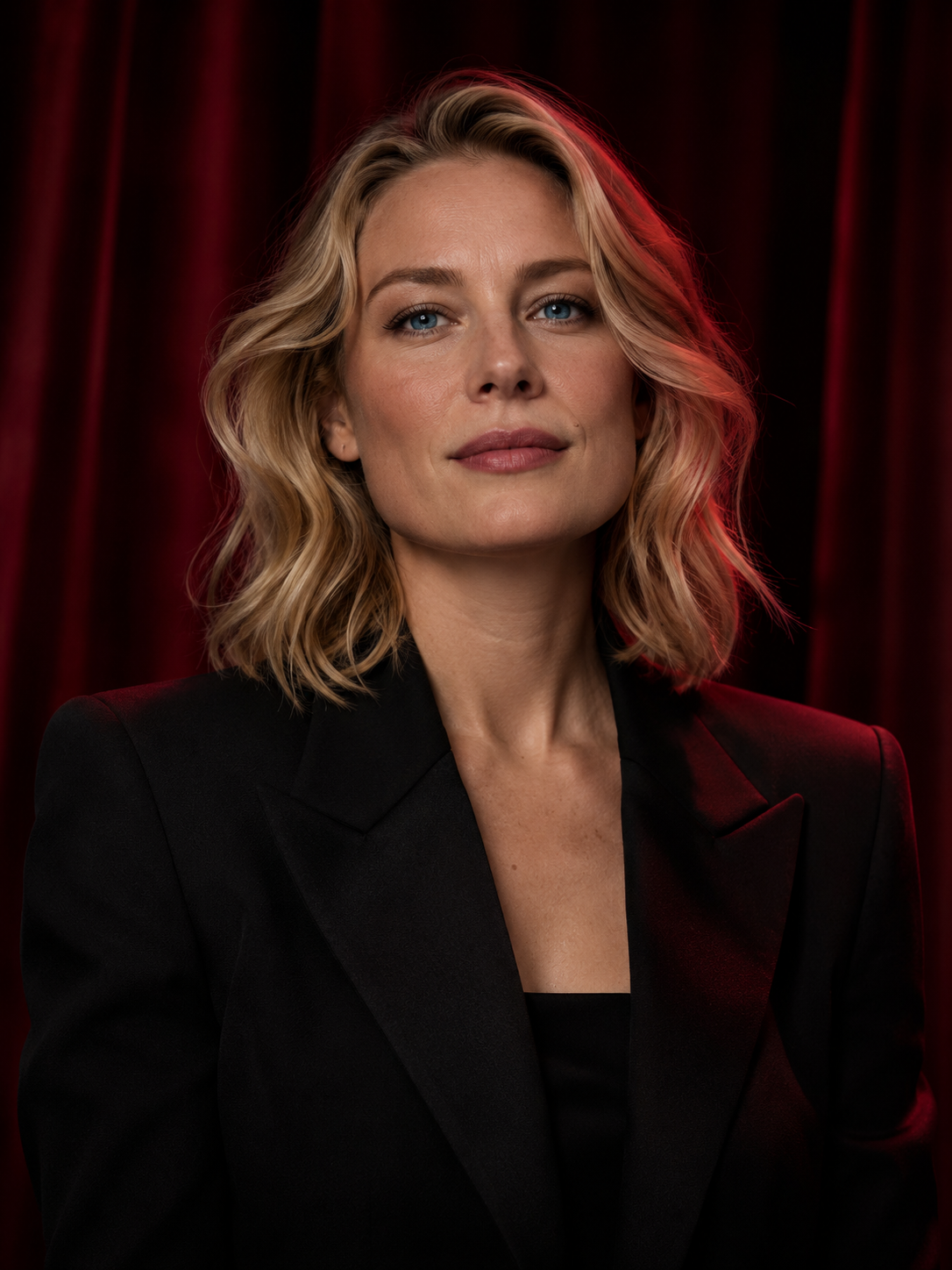
Use case: photorealistic-natural. Create a finished cinematic fashion editorial portrait, portrait 3:4 orientation. Subject: a fictional 34-year-old adult European woman with natural blonde hair and clear blue eyes. Shoulder-length softly waved blonde hair, composed confident expression, relaxed upright posture. She wears an opaque black tailored evening jacket over a tasteful black top. Frame head and upper torso with comfortable headroom and both shoulders inside the image. Almost-black background with softly out-of-focus wine-red theater curtains. Soft neutral key light preserves blue eye color and natural skin tones, with a restrained crimson edge light along the blonde hair and jacket. Realistic skin texture, authentic photographic detail, 85mm portrait lens, shallow depth of field, rich red-and-black noir color grade matching a coherent series of film portraits. Fully clothed professional fashion photograph. No text, logos, UI or watermark.
What this result shows
The result is a portrait-format head-and-torso image, 1086 × 1448 pixels.
The image shows the requested black jacket, opaque top and red-curtain setting.
This record contains one chosen output; attempts and rejection rates are not available.
Task trace and evidence
Record reference
RAP-93eb12c2d9429b8a
Creation route
Built-in image tool, outside Studio
Recorded status
Completed tool result recorded
Model identifier
Exact model version not recorded.
Local record time
Billing evidence
An actual generation charge and Studio credit transaction were not recorded.
Local tool completion record; not a provider-side creation or public-release timestamp. A local record time is not a first-publication date or a guaranteed generation-time measurement.
Evidence checked: Original tool completion record; Original prompt record; Matching source and displayed file hashes. Task references are shortened fingerprints; private task identifiers and response URLs are not published.
This record is not linked to a Studio generation or credit transaction. It does not establish the same behavior for a currently listed model.
File and source-record review: . The recovered local completion record is not a publication or exact provider-generation date.
These configurations come from the current catalog. Compare the specified settings and account requirements; other combinations can have different costs. Studio validates your selection before submission.
Current catalog · Retrieved . Options and credit estimates can change.
GPT Image 2
Account + credits
11 creditsper example requestView detailsHide details
Example configuration
Aspect ratio
1:1
Resolution
1k
Quality
standard
Format
png
Catalog configuration. Quality and content suitability have not been established by a comparative test on this site.
Prompt limit
1200 characters
This configuration is not marked subscription-only. An account and sufficient credits are required.
Choose text-to-image when the composition is still open
A written brief gives you room to explore a subject, setting and framing before committing to a reference. Specify one coherent visual direction, then compare versions by changing a single important detail.
If you already have an image whose composition matters, use image-to-image. If you want a clip, you can create a still first and continue with image-to-video; the video is a separate request.
How to create an image from a prompt
Define the composition
Describe the adult subject or original concept, the setting and the framing. Add a clear lighting direction and the visual style you want. Keep the description coherent rather than stacking conflicting styles.
Choose an image model
Compare the available image models and their controls. Select the settings offered for your chosen model and review the displayed credit estimate before you sign in and submit the request.
Review and choose the next step
Inspect the image's composition and details. Download a finished result, refine it with image-to-image, or use the workspace's Animate this image action to continue into image-to-video.
Check the result before choosing your next step
Inspect faces, hands, edges and fine textures at the output’s actual size.
Compare the result with the requested framing and light source, not only the overall mood.
Keep the prompt and settings with the version you choose so later changes have a clear reference.
Review and download the completed image in your account. Use Animate this image for a separate video request. Your account results are not automatically added to the public example gallery.
We do not use your personal information, prompts, uploaded files or generated content to train or fine-tune AI models.
Use Delete in My creations to remove a creation from your library and request server cleanup. Back up anything you want to keep first. Cleanup runs in the background; the confirmation does not verify that every stored copy or retained record has been erased. Once physical deletion is complete, the deleted file cannot be restored.
No. Text-to-image starts with a written description. Use image-to-image if an existing authorized image should guide the result.
Can I animate an image I generate?
Completed image results include an Animate this image action that continues to image-to-video. The video request has its own model settings, access requirements and credit estimate.
Does generating an image guarantee commercial-use rights?
No. Rights depend on applicable law, the inputs, model and plan conditions. A generated image does not grant rights to another person's likeness or third-party material. Review the Terms before using or distributing a result.