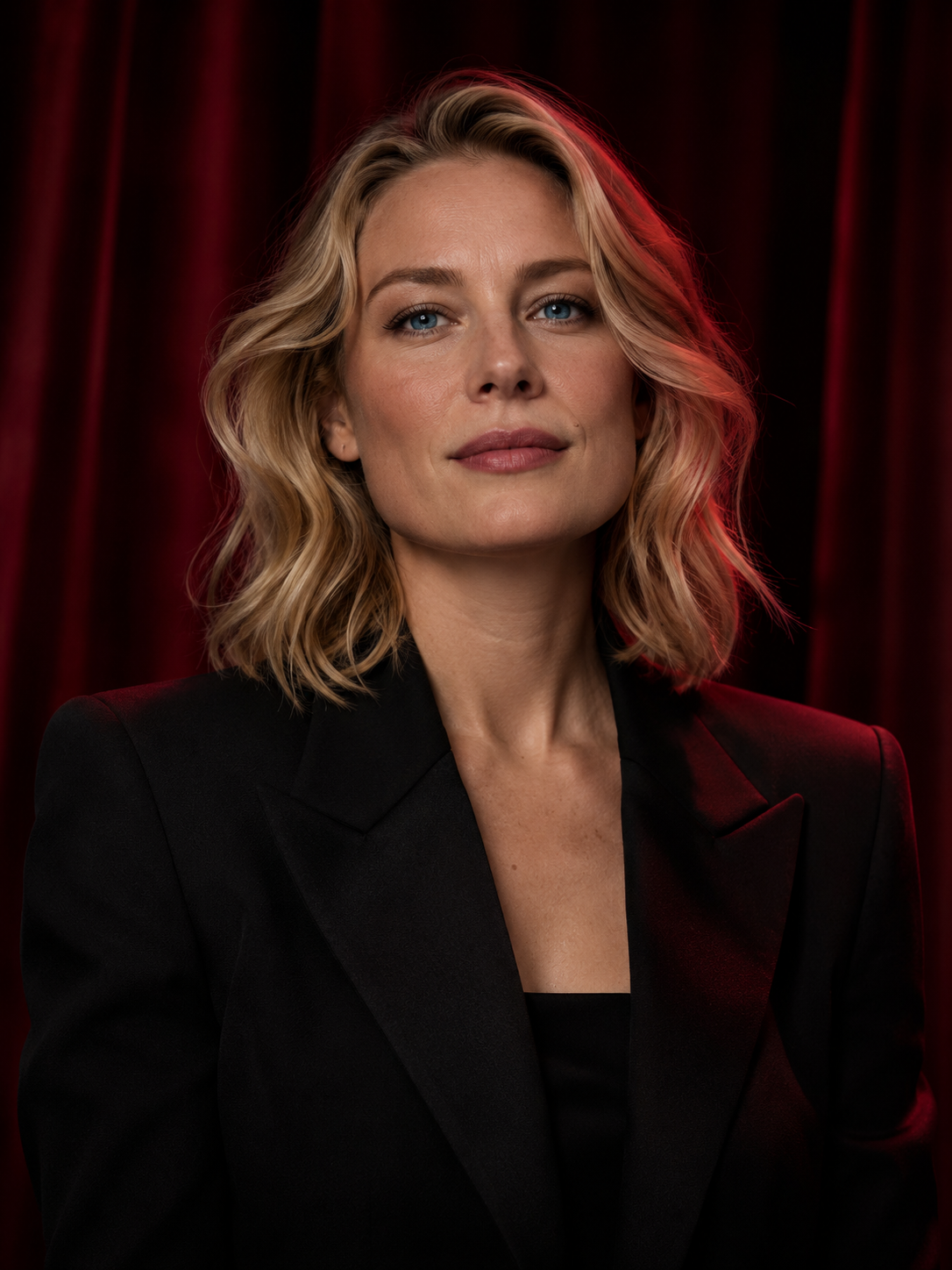
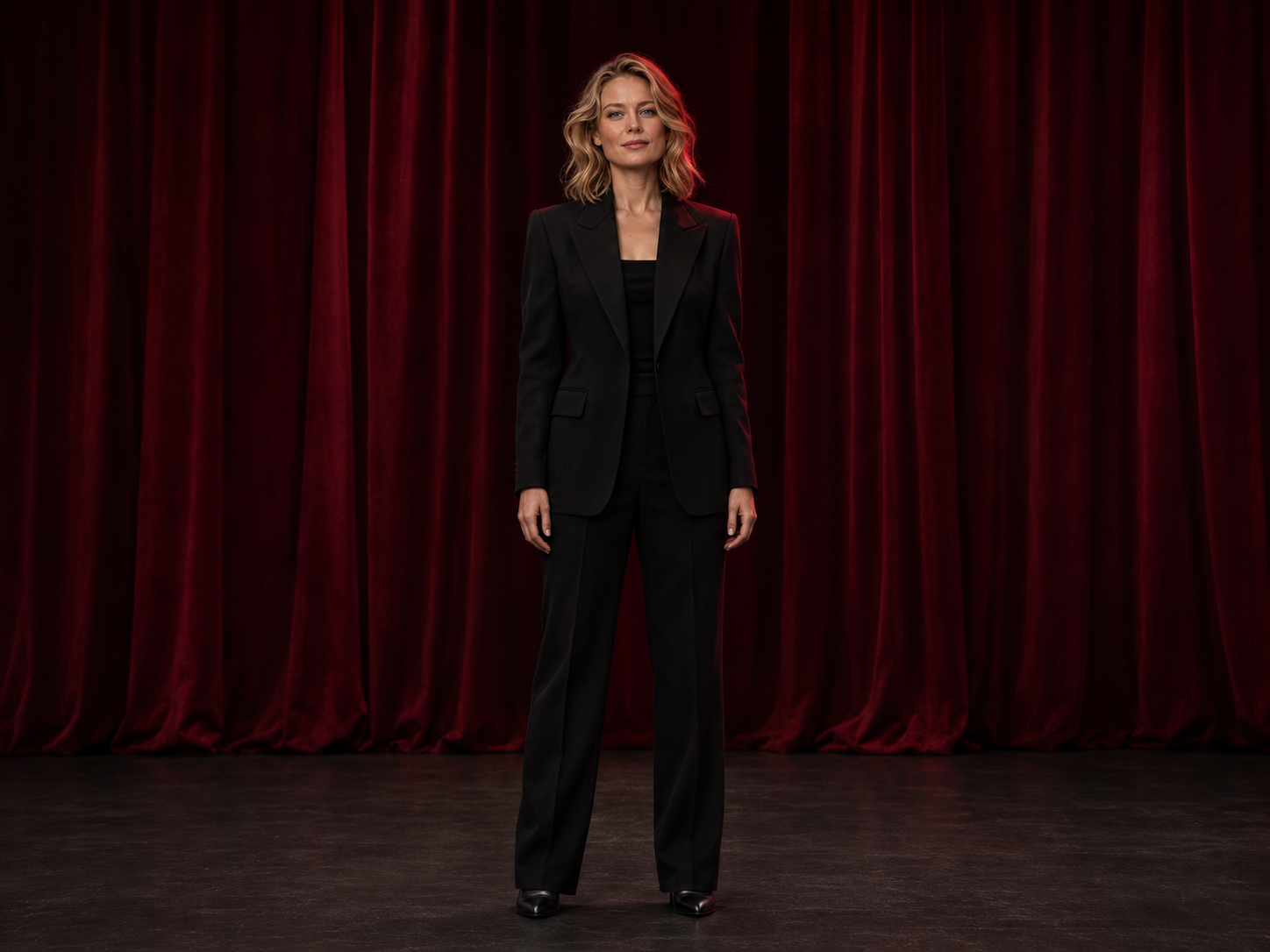
Start from an image you are allowed to use and describe a new visual direction. This workflow generates another interpretation of the reference, with settings determined by the selected image model.
Original input, generation record and observations
Generator
Built-in image_gen
Model
Model version was not recorded
Usage and cost
Created outside Studio; no Studio credit receipt is linked. Exact model version and actual charge are not retained. Recovered local tool timing is documented separately below.
Original generation prompt
Use case: identity-preserve. Edit the reference image into a new FULL-LENGTH cinematic fashion photograph of the SAME fictional 34-year-old adult blonde woman. Preserve her recognizable facial identity, clear blue eyes, blonde hair, natural skin texture, black tailored jacket and opaque black top. This is a composition expansion from a close portrait to a complete standing figure. Landscape 4:3 composition, approximately 1440x1080 or higher. Show her entire body continuously from the TOP OF HER HEAD to the SOLES OF BOTH SHOES, with comfortable empty space above her head and visible floor below both shoes. Both hands are naturally visible at her sides. Complete the outfit with opaque full-length black tailored trousers and simple black evening shoes. She stands in a relaxed, balanced neutral stance, facing the camera, calm composed expression, fully clothed. Her complete figure occupies approximately 75 percent of image height, centered with generous space around the silhouette. Deep wine-red theater curtains behind her, a dark floor clearly visible beneath her feet, neutral soft key light, restrained red contour lighting, detailed almost-black shadows. Professional photorealistic fashion editorial, camera at waist height with a natural 50mm perspective. CRISP FOCUS across her face, body, clothing and shoes from the first image. No portrait crop, no cut-off head, hands or feet, no close-up, no zoom effect, no motion blur, no soft-focus transition, no text, logos or watermark.
What this result shows
The output changes from portrait 1086 × 1448 to landscape 1448 × 1086.
Both shoes, hands and floor are visible in the output. The original input did not contain the lower body.
The trousers, shoes and wider setting are generated additions. They are not recovered details from the original photo.
Visual resemblance is not a measured identity-consistency result; no identity benchmark was performed.
Task trace and evidence
Record reference
RAP-0ae85291b5a07720
Creation route
Built-in image tool, outside Studio
Recorded status
Completed tool result recorded
Model identifier
Exact model version not recorded.
Local record time
Billing evidence
An actual generation charge and Studio credit transaction were not recorded.
Local tool completion record; not a provider-side creation or public-release timestamp. A local record time is not a first-publication date or a guaranteed generation-time measurement.
Evidence checked: Original tool completion record; Original prompt record; Matching source and displayed file hashes. Task references are shortened fingerprints; private task identifiers and response URLs are not published.
This record is not linked to a Studio generation or credit transaction. It does not establish the same behavior for a currently listed model.
File and source-record review: . The recovered local completion record is not a publication or exact provider-generation date.
These configurations come from the current catalog. Compare the specified settings and account requirements; other combinations can have different costs. Studio validates your selection before submission.
Current catalog · Retrieved . Options and credit estimates can change.
GPT Image 2
Account + credits
21 creditsper example requestView detailsHide details
Example configuration
Aspect ratio
1:1
Resolution
1k
Quality
standard
Format
png
Catalog configuration. Quality and content suitability have not been established by a comparative test on this site.
Source images
1–16 · up to 20 MB each
Prompt limit
1200 characters
This configuration is not marked subscription-only. An account and sufficient credits are required.
Choose image-to-image when a reference should guide the change
Use an authorized source when you want to explore a different lighting direction, setting or visual treatment. State the intended change separately from the features you want the result to retain.
Use text-to-image for a composition that does not need a source. Choose image-to-video when the next step is motion rather than another still. Image-to-image generates a new interpretation; it is not precise manual retouching.
How to create a new image from a reference
Add the right source image
Sign in and upload an image you have the rights to process. Every identifiable real person must be an adult and must consent to the specific transformation and intended use. Check the upload control for the current file and size limits.
Separate changes from essentials
Describe which parts of the composition, lighting or style you want to change, and which details matter to your idea. Use the controls exposed by your selected model; an input image does not guarantee exact preservation.
Compare the new version
Review the credit estimate before submitting. After completion, compare the result with your intended changes, download a version you need, or continue into image-to-video with a suitable reference.
Check the result before choosing your next step
Compare the original and output at similar sizes to see what changed.
Inspect identity, pose, edges and layout instead of assuming they were preserved.
For another iteration, change one part of the direction and keep the input consistent.
Download the result you choose, or use it as a reference in another image or video task. Each new request has its own settings and estimate. The account workspace does not publish your result to the public gallery.
We do not use your personal information, prompts, uploaded files or generated content to train or fine-tune AI models.
Use Delete in My creations to remove a creation from your library and request server cleanup. Back up anything you want to keep first. Cleanup runs in the background; the confirmation does not verify that every stored copy or retained record has been erased. Once physical deletion is complete, the deleted file cannot be restored.
No. Image-to-image uses an authorized source image together with a written direction. Text-to-image begins with the text prompt without requiring a reference upload.
Can I use another person's photo?
Only with the required rights and the adult person's informed, freely given consent to this processing and intended use. A publicly available photo or a personal relationship does not establish permission.
Will this preserve a face or composition exactly?
Exact identity, pose, layout or pixel-level detail is not guaranteed. Results depend on the selected model, input and settings. Inspect every output before use; do not treat this as a guaranteed identity-preservation tool.